
Third-party cloakers
- How to use
- Several cloakers for the same campaign
- Request from the tracker to cloaker
- Expected response
- Results in Clicklog
Adding your cloaker or traffic checking service to the campaign. For each click, the tracker asks the cloaker if it's a bot or not and takes the info into consideration along with Binom Protect, Adspect, and Magic Checker.
How to use
First, create a cloaker in Settings > Integrations > Third-party cloakers section or directly from the Campaign settings Advanced settings > Third-party cloakers.
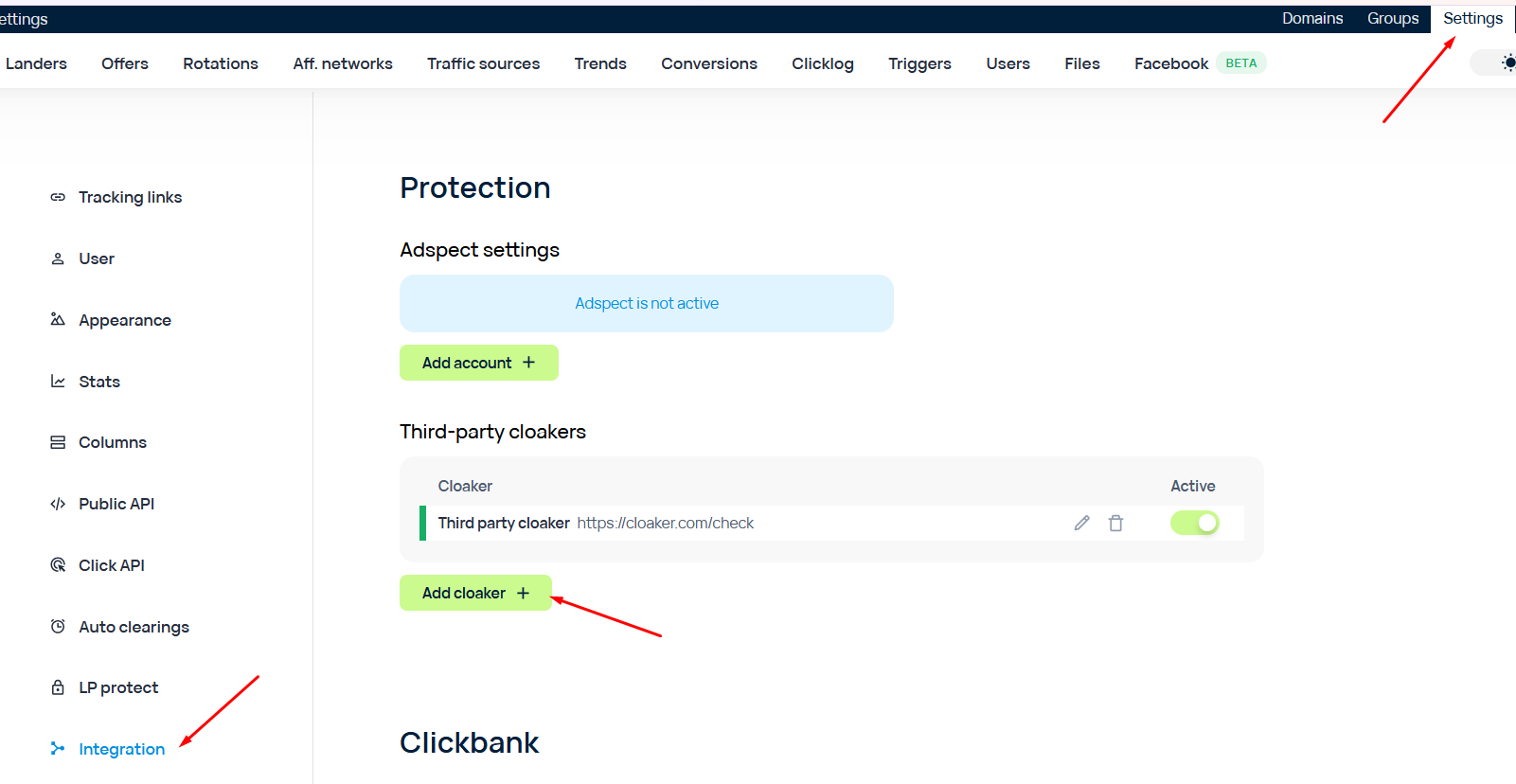
Provide a Name, URL and authorization headers (for example, X-Api-Key).
After that, add the cloaker to campaigns. You can add any number of cloakers to a single campaign. Likewise one cloaker can be used in any number of campaigns.
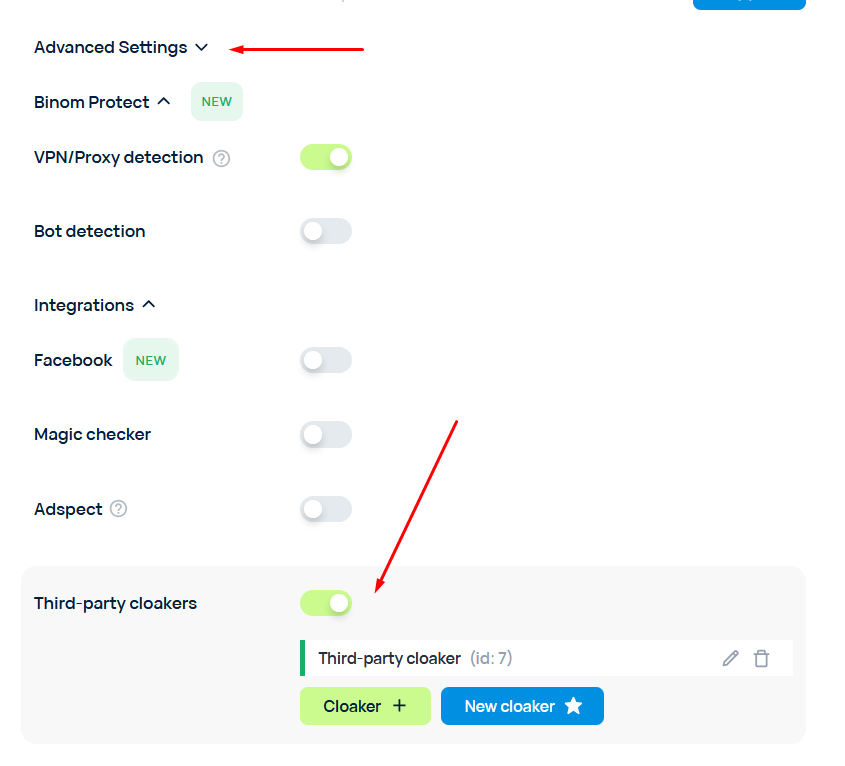
For each click, the tracker sends a simultaneous request holding the click's data to the enabled cloakers of the particular campaign.
If at least one check (any of cloakers, Binom Protect, Adspect, Magic Checker) considers the click a bot, that click is treated as a bot.
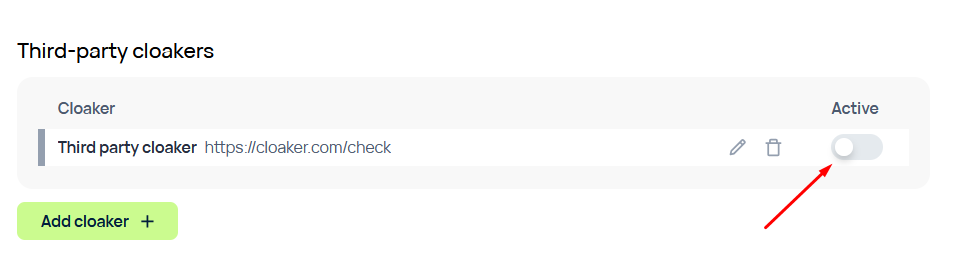
You can temporarily disable the cloaker without removing it from the campaigns. The changes would be applied immediately without a restart.
Several cloakers for the same campaign
The requests to all the cloakers are sent at the same time. The decision is based on the first responding cloaker:
| Situation | Click summary | What is recorded for the click |
|---|---|---|
| One of the cloakers responded isBot: true | bot | ID of the first positively responding cloaker. Other unprocessed requests are terminated. |
| All responded isBot: false | not bot (according to cloakers) | ID of the first responding cloaker, Is Bot (Cloaker) = 0 |
| Noone responded or everyone responded with an error | not bot (according to cloakers) | Cloaker ID = 0 |
«First» is defined by the response time, and not by the position in the list of cloakers.
Request from the tracker to cloaker
POST to the URL of the cloaker, Content-Type: application/json. Headers from the cloaker settings are passed as is, with the exception of Content-Type: it always has a value of "application/json". The user's headers are passed only in the body of the request.
          {
            "campaignId": "123",
            "clickId": "a1b2c3...",
            "ip": "1.2.3.4",
            "method": "GET",
            "url": "https://trk.example.com/click?key=abc&t1=x",
            "host": "trk.example.com",
            "path": "/click",
            "query": { "key": ["abc"], "t1": ["x"] },
            "headers": {
              "User-Agent": ["Mozilla/5.0 ..."],
              "Accept-Language": ["de-DE,de;q=0.9"],
              "Referer": ["https://source.example.com/"]
            },
            "geo": {
              "countryCode": "DE", "country": "Germany", "region": "Berlin", "city": "Berlin",
              "isp": "Deutsche Telekom", "organization": "Deutsche Telekom AG"
            },
            "device": {
              "type": "mobile", "brand": "Samsung", "model": "Galaxy S23",
              "os": "Android", "osVersion": "14",
              "browser": "Chrome", "browserVersion": "129"
            }
         }
| Field | What is it |
|---|---|
| campaignId, clickId | ID of campaign and click in the tracker |
| ip | IP of the user, detected by the tracker (including proxy and CDN) |
| method, url, host, path | Request of the user to the tracker |
| query | URL Params: name → list of values |
| headers | All headers of the user: name → list of values |
| geo | Geo and Provider as detected by the tracker |
| device | Device, OS, and browser as detected by the tracker |
Expected response
HTTP 200, a JSON with a boolean field isBot. Other fields are ignored.
        { "isBot": true }
        or
        { "isBot": false }
Tracker expects to get a response within 1 second. Everything from the list below is considered a missing response, and the click is not counted as a bot. The error is recorded to the tracker's log. Traffic is not stopped.
1. Timeout (more than 1 second);
2. Any status except 200, including redirects which the tracker will not follow;
3. Invalid JSON, missing isBot field, or the field doesn't have a boolean value ("true" and 1 are incorrect);
4. Response body is larger than 64 KB.
The integrator should also take into account that if the JS check of Binom Protect is enabled - one click can have up to 3 requests: basic, full check upon the first click, and full check after the JS check. All of them will have the same clickId.
If there is more than one cloaker in the campaign, the connection to all others will be terminated once the tracker receives a bot-positive response. Terminated connections should be an expected behavior for the cloaker.
Results in Clicklog
There are two columns in the Clicklog that show which cloaker made a decision about the click and the verdict itself:
| Column | Meaning |
|---|---|
| Cloaker ID | ID of the cloaker recorded by the "first responder" rule. 0 - no cloakers in this campaign; none are enabled; none provided a response. |
| Is Bot (Cloaker) | 1 — cloaker responded "bot", 0 — «not bot» or no response was provided. |
The overall verdict about the click (bot or not, including all checks) remains in the usual columns. If the click is a bot and Is Bot (Cloaker) = 0, this means that the click was detected by another check.