
Import from Keitaro
You can transfer settings from Keitaro by using the built in import. You can transfer the following basic objects: campaigns, landers, offers, affiliate networks, traffic sources, domains, users, custom rotations.
You would require access to Keitaro Admin API in order to make an import. Make sure that your plan includes access to it.
How it works
To start the import, you need to go to Settings > Import/Export > Keitaro.
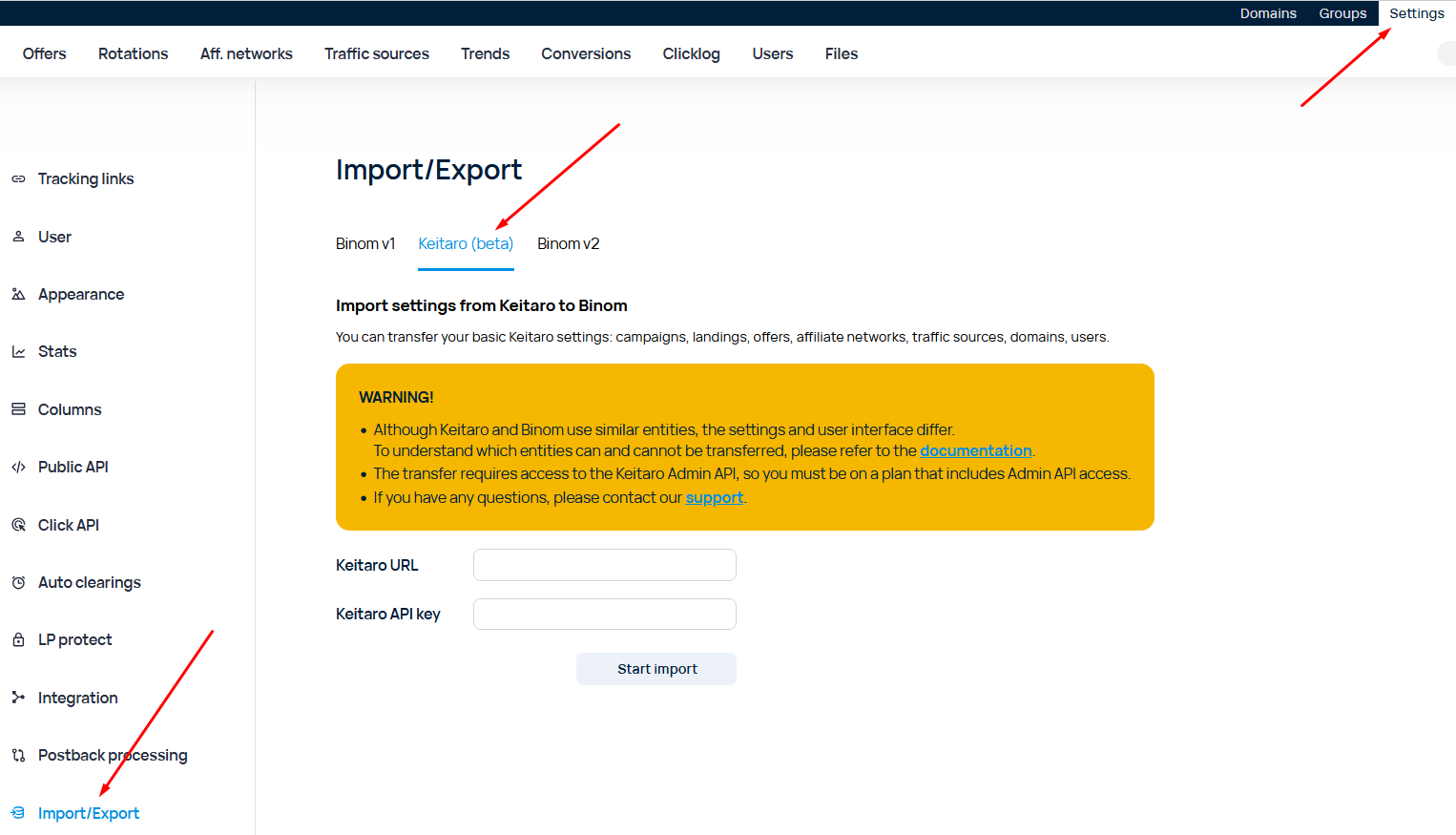
Paste the login page address into the Keitaro URL field (commonly available as http://domain.com/admin).
Paste the API key into the Keitaro API Key field. You can find your API key in Account > API keys.
Import is available only on a "clean" tracker.
Nuances
Despite both Binom and Keitaro having a similar set of used objects, there are some nuances when it comes to transferring settings.
Domains
Only the Domain field is transferred.
Group, Crawlers, Admin Dashboard, HTTPS-only, Index-page are not transferred.
Traffic sources
Name, Traffic Loss, S2S postback are transferred.
Parameters are transferred as tokens of the traffic source.
External ID and Cost are transferred 1-to-1
Numbered parameters are transferred. In case the Parameter field name was"sub_id_1", it will stay this way.
Keyword, Currency, External ID, Creative ID, Ad Campaign ID, Site are transferred in the same way as numbered tokens and are being recorded in the empty slots. For example, if Token 1 was empty, Keywords token would go there, etc.
Affiliate networks
Name, Offer parameters, Postback URL are transferred.
Offers
Offer name, Group, Affiliate network, Countries, Payout, Conversion cap, Notes are transferred.
Because Binom supports only one value in the Country field, only the first country is transferred.
Unsupported currencies are converted into USD; the cost stays the same (meaning 100 of currency X is converted to 100 USD). The Payout type field is ignored.
Values are not transferred.
Preload and Redirect offer types are converted to regular offers, the Redirect is ignored.
Local offer types are converted to a regular offer, the URL is default domain + path to local files. For example, for the Local with /lander/foo/index.html path in case the IP is 1.2.3.4, the URL would be http://1.2.3.4/landers/foo/index.html
Action offer types are converted to a regular offer. A file in the landers folder is created that imitates the behavior of the corresponding action. For example, for the offer with the Action type and 404 response, a file would be created in landers/xxxx/index.php with a php code that returns a 404 error, the offer URL would be http://1.2.3.4/landers/xxxx/index.html
Send to campaign action type would be ignored.
Landers
Due to the differences in naming system of the tokens of Binom and Keitaro trackers, you would need to make sure that you are using correct tokens on your lander by checking this list of tokens.
For example, the token to get from lander to offer in Binom is {offer_link}, while in Keitaro it's {offer}.
Name, Group are transferred.
Preload and Redirect lander types are converted to an external lander. Redirect type is ignored.
Local lander type is converted to an integrated lander.
Lander of the Action type is converted in the same way as the Action offer. In case of successfull conversion a path to the generated file is used.
Campaigns
Campaign name, Domain, Group, Source, Cost, Traffic Loss, Alias, Notes, Flows are transferred.
Cost is transferred, but all Cost types, except for CPC, CPA, CPM, are converted into CPA.
Uniqueness, Use Cookies, Uniqueness TTL, Api Token, Status, Parameters are ignored.
S2S postbacks field is ignored, but it's value is pasted into the Note of the campaign.
Flow rotation and Bind to are converted as such:
| Flow rotation | Keitaro | Binom Traffic distribution type |
|---|---|---|
| Position-based | Any value | Top to bottom |
| Weight-based | Disable (empty) | Normal |
| Weight-based | Flows | Fix on Paths |
| Weight-based | Flows, landing pages | Fix on Paths & LPs |
| Weight-based | Flows, landing pages, and offers | Fix on Paths & LPs & Offers |
Custom rotations
Flow is converted into Rule. Schema is converted into Path.
Flow of Default type is converted into Default path.
Flow of any other kind is converted to a set of Rules.
Weight, Name, Notes are transferred.
Schema of the Landing pages & Offers type is converted into a Path. In case the landers are not set, a Path with Direct landing is created. In case the offers are not set a Path with Direct offer dummy is created.
Schema of the Direct URL type is converted to a Path with Direct landing and Direct URL offer with the said URL.
Schema of the Action type is not transferred.
Monitoring field is not transferred.
Filters
Filters in Keitaro can be AND and OR. Some filters are converted into a combination of several criteria.
| Filter type | How it is transferred |
|---|---|
| Date between | Not transferred |
| Timetable | A combination of Day of week and Part of day |
| Limit clicks | Not transferred |
| Parameter | URL criterion with a set of regular expressions |
| Referrer | Converted to Referrer |
| Sites | Converted into a combination of Referer OR URL by source and utm_source |
| X-Requested-With | Converted into Headers with pairs X-Requested-With:%value1%, X-Requested-With:%value2%, etc. |
| Keyword | Converted into URL criterion with keyword parameter (same as Parameter) |
| Search engine | Converted into URL criterion with se_referrer parameter (same as Parameter) |
| Ad campaign ID | Converted into URL criterion with ad_campaign_id parameter (same as Parameter) |
| Creative ID | Converted into URL criterion with creative_id parameter (same as Parameter) |
| Empty referer | Converted into Referer with an empty value list and checked "Include empty and unknown value" and "Exact match" |
| Proxy detected | Converted into Proxy/VPN |
| City | Converted into City |
| Region/state | Converted into Region |
| Country | Converted into Country |
| IP | Converted into IP is xxx criterion. In case of @empty - converted into IP is xxx OR IP is v6 |
| IPv6 | Converted into IP version is v6 |
| Mobile operator | Converted into ISP |
| ISP | Converted into ISP |
| Uniqueness | Converted into Uniqueness ("for this flow" value is converted into "in campaign") |
| Bot | Converted into Bot |
| Connection type | Converted into Connection type |
| Browser | Converted into Browser and Version |
| Browser version | Converted into Browser and Version. Between, equals or greater, equals or less operators are ignored. The values stay the same. |
| Device model | Converted into Brand and Model |
| Device type | Converted into Device type |
| OS | Converted into OS and Version |
| OS version | Converted into OS and Version. Between, equals or greater, equals or less operators are ignored. The values stay the same. |
| User agent | Converted into User agent |
| Language | Converted into Language |
| Sub ID 1-30 | Converted into Token 1-30 |
Users
Username is transferred. The new password will be displayed in the import interface.
The Administrator user type is converted into User with Role=Admin, granting full access to everything.
>Language, Time zone, First day of the week and Theme fields are not transferred.
Access is transferred.
Affiliate Networks, Domains, Groups, Landing Pages, Offers, Traffic Sources and Campaigns are transferred.
Archive, Clicks log, Dashboard, Geo DBs, API keys, Conversions, Delete statistics, Geo profiles, Integrations, Logs, Report and Trends are ignored.
Report restrictions are not transferred.
Access to Flows is converted into access to Rotations. If the access suggested "read all" and "modify all", it will be converted as such. If the access allowed access to specific flows, it will be converted into "no access".