
Integrated offers
The integrated offers feature allows uploading files to the server with the tracker via a .zip archive. The offer will be opened without the standard 307 redirect.
Creating an integrated offer
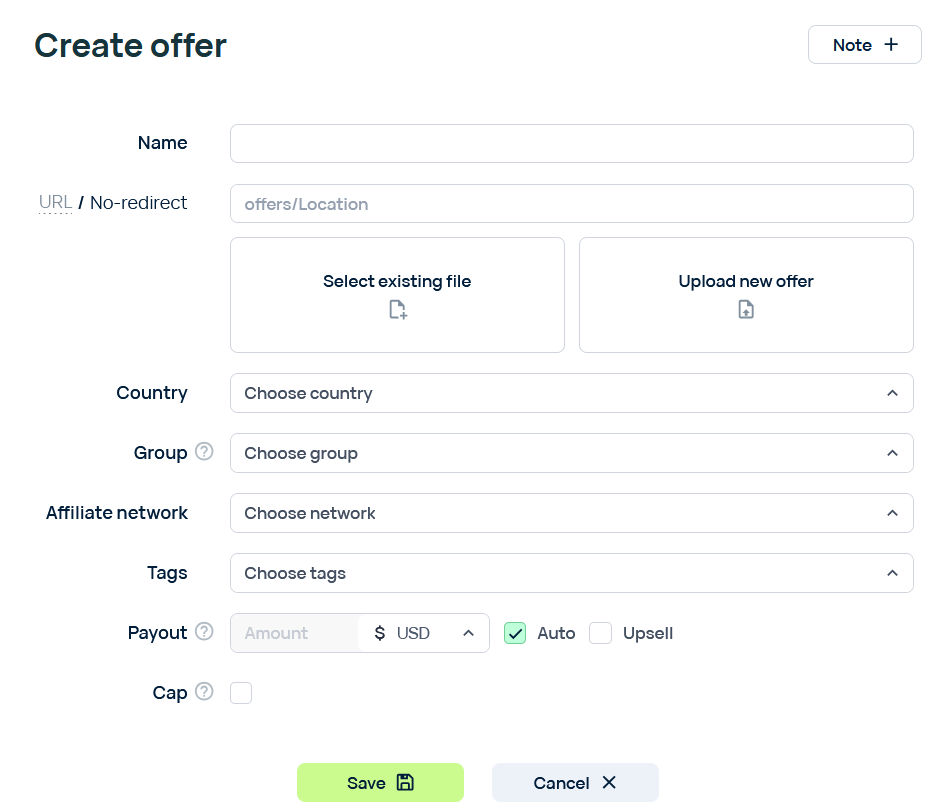
You need to follow these steps in order to create an integrated offer:
Make sure that your archive has only one index.html or index.php file, and that the file is in the root directory of the archive.
1. Press the "Create" button
2. Choose "No-redirect" to set the mode to "integrated"
3. Press "Select existing file" or "Upload new offer" to either select an existing file or provide a new one. You can upload an offer in either .zip format or just the index page (index.html or index.php)
4. Choose the country, group, affiliate network, and tags for the offer if needed
4.1 Fill in the payout info
5. Press the "Save" button to save the offer
The maximum size of an archive with an integrated offer page is 20 MB
Passing tokens to an integrated offer
There are two points in time where you can get the value of a token:
Getting tokens in the HTML code of an offer
You can use any tokens in your integrated offer code. For example, you can use the {clickid} token to dynamically show the clickid value.
Getting tokens in PHP code, before the HTML page is rendered
To get the value of a token in PHP code, you need to extract it by key from the $_POST array:$_POST['{some_token}']
This can be useful in a situation where you need to process the value before displaying it on a page, or when you don't need to display it at all. For example, to place the value of the isp token into a file, you need to write such a code snippet:
file_put_contents('somefile.txt', $_POST["{isp}"] ?? 'Unknown isp');
The _md5 tokens are not available in PHP code. To get an md5 token, please use the built-in md5 function. For example:
md5($_POST["{isp}"])
If you don't need to process the token in PHP code, you can just use a placeholder. For example, if you need to display the isp, you can do it as follows:
echo "ISP is {isp}
";
This placeholder will be processed after rendering and will be changed for a token after that.