
Warning: Undefined array key "HTTP_ACCEPT_LANGUAGE" in /var/www/html/check_language.php on line 6
FAQ
-
Tracker file access
-
Can I access landing page files via FTP/SFTP?
Yes, you can. By default, landing page files are stored on the server in the folder
/var/lib/docker/volumes/binom_landers_data/_data/. We do not recommend connecting to the server as root to work with landing pages. Our support team can create a separate user for you to work with landing pages via SFTP upon request. -
Can I set up direct access to a file from the root domain?
Yes, you can. To do this, create a folder named "custom-index" in the "Files" section and upload the necessary files to it.
The folder on the server -
/var/lib/docker/volumes/binom_landers_data/_data/custom-index.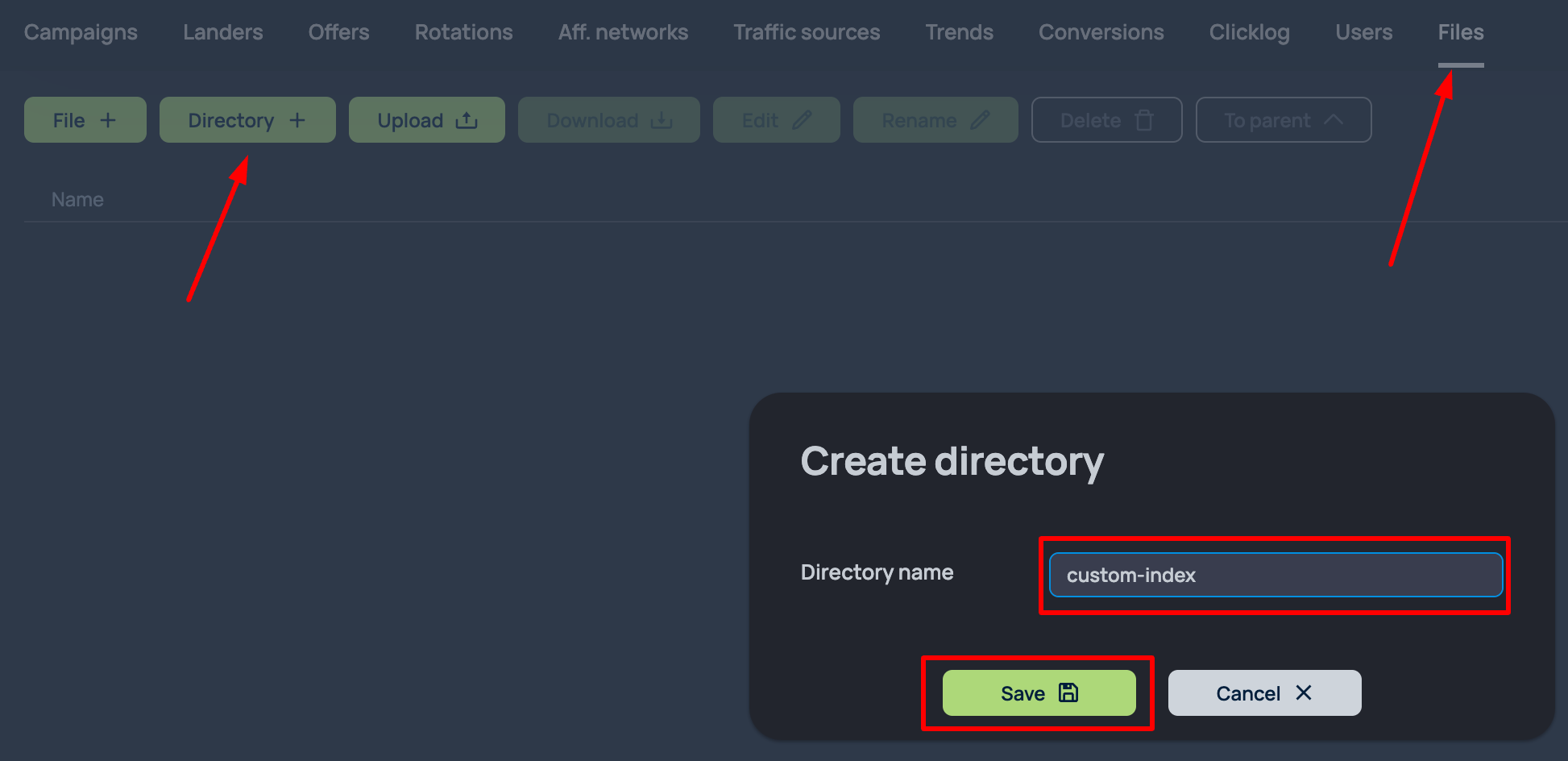
-
Can I access landing page files via FTP/SFTP?
-
Functionality questions
-
Am I allowed to make server customization other than changing the server specs?
We cannot guarantee stable tracker work in case you temper with the server. All the changes that are made on your server by someone other than Binom team are made at your own risk.
-
How is the Load on the Monitor tab calculated?
The load is calculated based on the amount of cores that your server has and the Load Average parameter. Example: Your server has 4 cores. 100% load is Load Average: 4. If the current load is Load Average: 2, the tracker will show a Load of 50% on the Monitor tab.
-
Issues with the "#" symbol in the campaign links.
Some traffic sources (e.g. Adsterra) use symbol "#" as a part of their tokens. Due to how this symbol is processed by the borwsers using the Chromium engine and due to how our web-server processes this symbol in particular, in case the traffic source fails to swap their token for the real value and the symbol "#" is a part of the campaign url, the other tokens, following the "#" symbol in the Campaign Link, will not be recorded by the tracker because the symbol "#" will be treated as the "Named Anchor" or "Anchor Identifier" (details on anchors), and not as a "param=value" pair.
Same can be true for the lander and offer links. Everything following the "#" symbol in the lander of offer link can be lost.
Also in Chromium-based browsers it can so happen, that if you have tokens with "#" symbols in your campaign link and a Direct landing, those tokens will be forwarded to the offer URL.
-
Usage of Zabbix
We recommend that you don't use Zabbix as a monitoring service for your server because it disrupts some processes of the tracker and interact with the MYSQL database.
As an alternative that we can recommend is a duo of Node Exporter + Prometheus.
-
Why do I see IP/ISP of Cloudflare in the tracker?
By default, the tracker will show the real IP of the traffic in case the proxying via CloudFlare is on for the domain without any additional settings.
However, the traffic that goes throug WARP is hidden by Cloudflare and the IP address is not forwarded. Thus the IP address\ISP would always be of Cloudflare.
-
How can I use a custom 404 page?
You need to place your file named "404.php" in this folder
/var/lib/docker/volumes/binom_landers_data/_data/custom-index/404.php -
Why was my traffic redirected from binomchain.com to this page?
binomchain.comis a Binom service domain intended only for access to the tracker control panel. It must not be used as a campaign, landing page, postback, or any other real traffic domain.If a visitor reaches
binomchain.comas a tracking domain, the request is automatically redirected to this page. This protects the control panel, keeps user traffic isolated from service infrastructure, and helps maintain security, stability, and speed.For real traffic, connect your own domain in the Domains section and use it in campaign, landing page, and postback links.
-
How to protect your server against CVE-2026-31431 exploit?
In order to remove the possibility to use the exploit to get root access to your server (details here), run the following commands on your server:
1) Update kmod
sudo apt update && sudo apt install --only-upgrade kmod
2) Stop the Docker service:
sudo systemctl stop docker
3) Reboot the server:
sudo reboot
If you cannot reboot the server:
4) Remove the module manually:
sudo rmmod algif_aead 2>/dev/null
5) Make sure that the module is not loaded:
grep -qE '^algif_aead ' /proc/modules \ && echo "Affected module is loaded" \ || echo "Affected module is NOT loaded"
Or contact our support service.
-
Am I allowed to make server customization other than changing the server specs?
-
Landers
-
How can I create an additional domain for landings?
Run this command in the console on your server:
wget https://data.binom.org/binom_v2_install.sh -O /root/binom_v2_install.sh && bash /root/binom_v2_install.sh l
-
How can I create an additional domain for landings?